Find your crossplay invite steps
Loading the interactive tool…
Yes. Arkheron crossplay supports Steam on Windows, PlayStation 5, and Xbox Series X|S in Early Access 1.0. Use Arkheron’s in-game friend code and Social panel to connect across platform networks, then invite up to two friends for a three-player active squad. If someone still needs the client, start at the official Arkheron play page, which lists the full editions and the free Friend Pass.
The safest route is the in-game friend system. Steam’s Discord joining tools are useful, but they are a PC-specific shortcut rather than the basis of console crossplay.
Does Arkheron Have Crossplay on Every Launch Platform
Arkheron’s official launch material says players can team up across Steam, PS5, and Xbox Series X|S. The supported combinations are not limited to PC-to-console or console-to-console pairs; the same published crossplay support covers all three platform families.
| Player platform | Crossplay status | Normal way to connect |
|---|---|---|
| Steam on Windows | Supported | Arkheron friend code, in-game invite, or Steam/Discord party tools |
| PlayStation 5 | Supported | Arkheron friend code and in-game invite |
| Xbox Series X and Series S | Supported | Arkheron friend code and in-game invite |
Crossplay does not mean every store entitlement is interchangeable. A Steam purchase does not automatically establish PlayStation ownership, and the Microsoft Store’s Play Anywhere listing applies inside the Xbox/Microsoft ecosystem. Treat play access, crossplay, and cross-progression as three separate questions.

The official status is stronger than a single-platform screenshot: Bonfire’s launch pages explicitly name Steam, PlayStation 5, and Xbox Series X|S. Current launch-client footage also shows a Cross Play: On status in the party view. However, the available launch evidence does not include one continuous recording of Steam, PS5, and Xbox players all joining the same squad. This guide therefore relies on the official platform support statement for the full matrix and uses recorded client evidence only for the interface states it actually shows.
How to Add a Cross-Platform Friend
The Arkheron Player Support instructions describe one common friend-code flow for the supported platforms:
- Go online and remain at the main menu.
- Open Social with the Echo icon in the lower-right area.
- Select Add Game Friend.
- Share your unique Arkheron friend code, or enter the code your friend gives you.
- Wait for the request to appear and be accepted.
- Open the online friend’s profile and send a party invite.
- After the party forms, have the party leader select the mode and start the queue.
This is an Arkheron friend relationship, so it is the correct route when a Steam friend is trying to add a PS5 or Xbox player. A Steam, PlayStation Network, or Xbox network friendship by itself is not a substitute for adding the other player inside Arkheron.

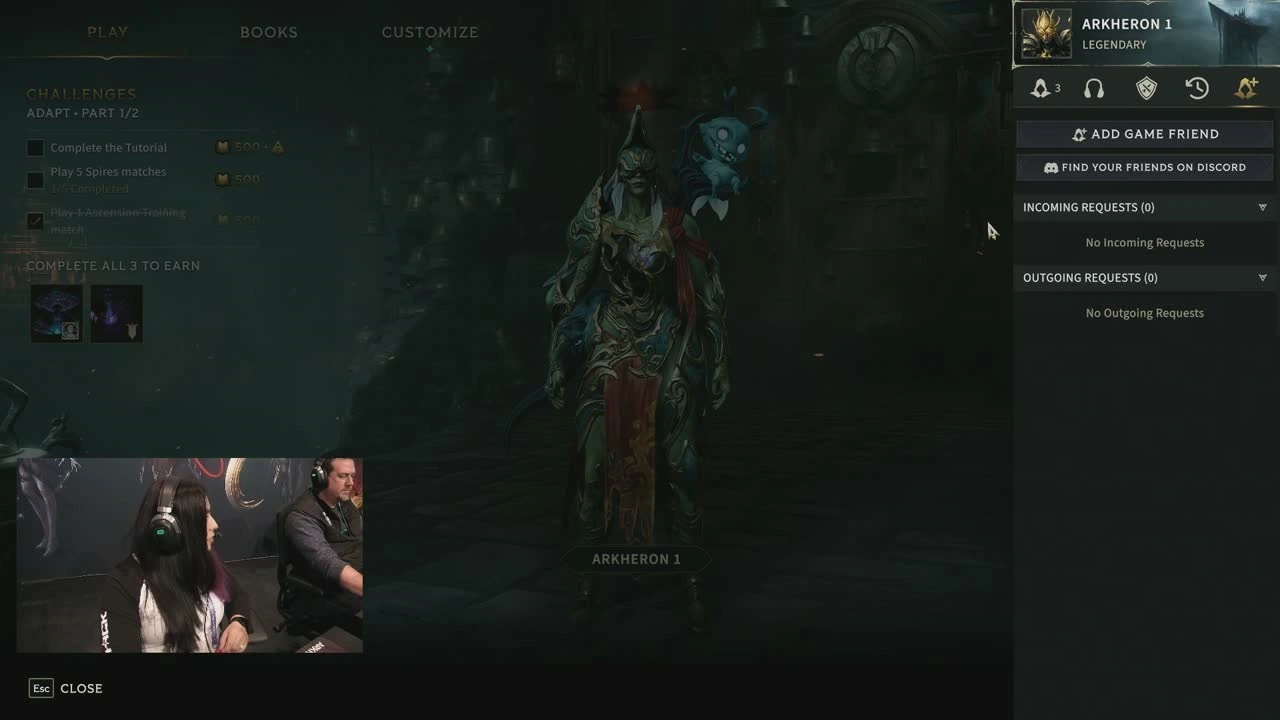
Early Access 1.0 launch footage shows Add Game Friend in the Social panel beside the Discord discovery option. It also shows an Invite Friends entry in the current keyboard friends list. On Xbox launch-weekend footage, an incoming party invitation appears with a controller response prompt, but that recording does not identify the sender’s platform. These observations confirm the visible menu and recipient states without pretending that they prove every sender-and-receiver combination.
On PS5, the Early Access 1.0 patch notes say the Friend Code field is no longer editable. If you see a read-only code field, do not try to overwrite it. Use Add Game Friend and the code-entry flow intended for adding another player. The patch note does not define every PS5 screen in that flow, so follow the labels shown by your current client.
Which Invite Route to Use
Choose the route based on what every player in the group can access.
In-game invite for any mixed-platform squad
Use the friend-code method above whenever the party includes PS5 or Xbox players. It avoids platform-network boundaries and keeps the invitation inside Arkheron. Once the friend is online and in game, select the profile and send the party invite.
Discord joining for Steam players
Early Access 1.0 adds Discord activity joining and channel invitations on PC. The Discord desktop app must be running, activity sharing must be enabled, and Arkheron must appear under Registered Games. A Steam player can then join from a friend’s Discord activity or use a channel invitation. If the game is closed, accepting a valid invitation can launch Arkheron and take the player to the party or custom lobby.
This shortcut is documented for PC and Steam users. Do not use a Discord Join button as proof that a PlayStation or Xbox recipient can take the same route. Console players should use the Arkheron Social panel.
Partner Server party finding on all supported platforms
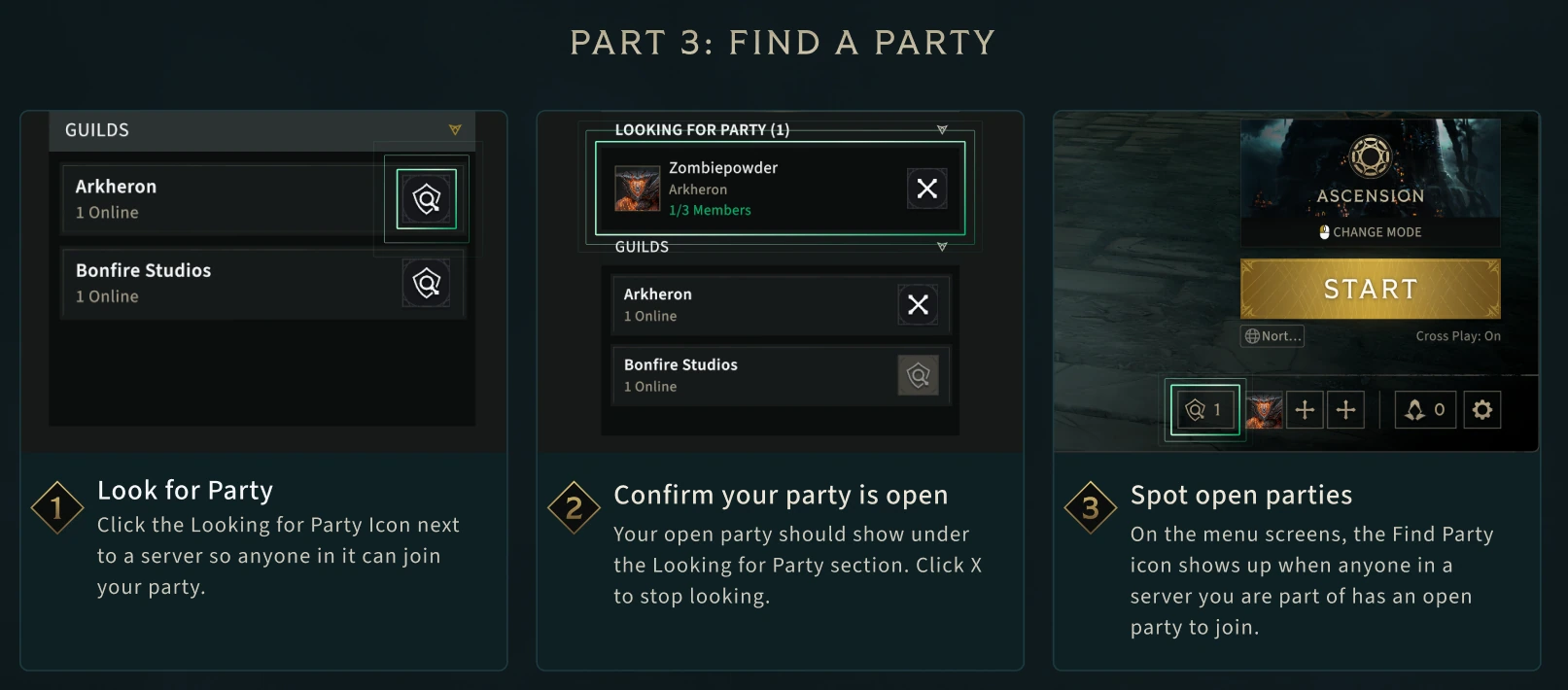
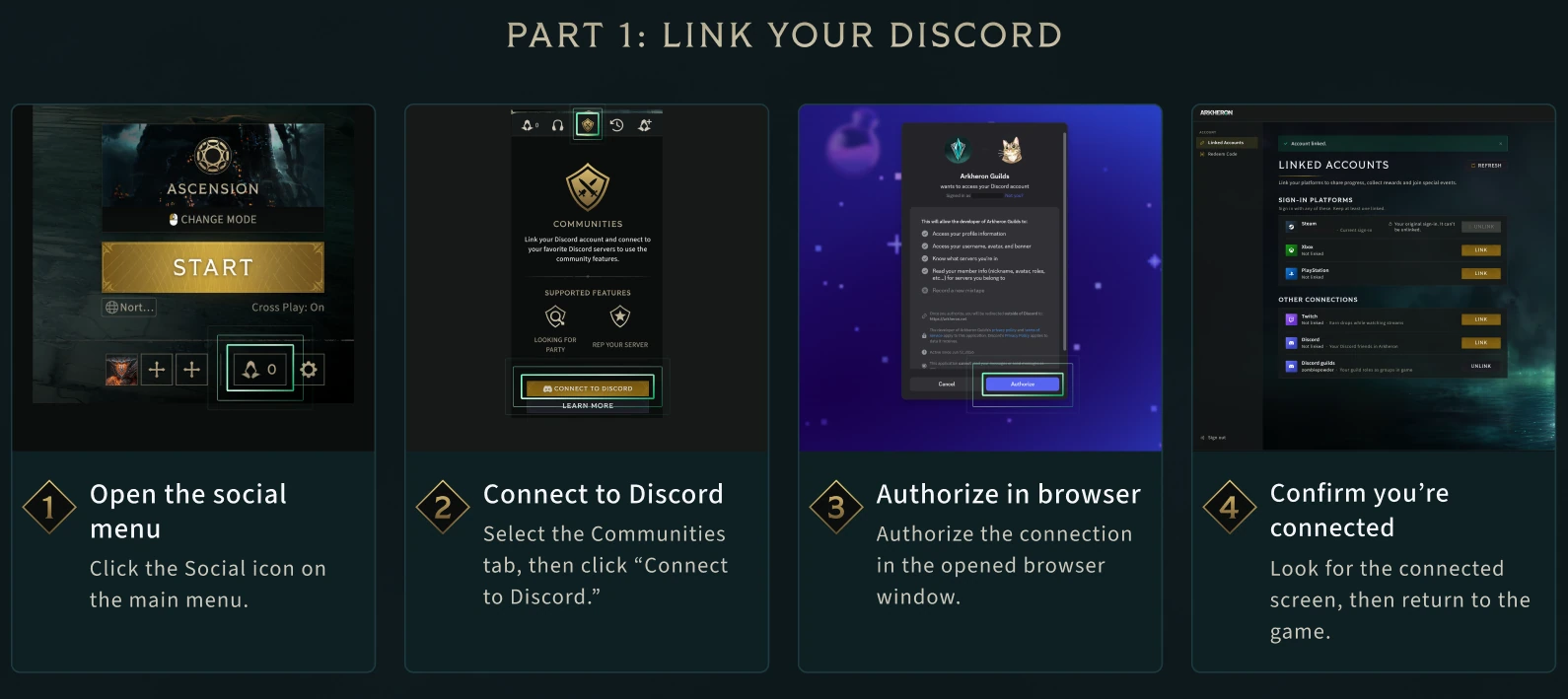
Arkheron’s Partner Servers guide says its connected-community and Looking for Party features work on Steam, PS5, and Xbox Series X|S with crossplay. After connecting Discord in the Communities tab and authorizing it in a browser, players can add communities, view open parties, or advertise one open party to one community at a time.
Partner Servers help you find teammates; they do not replace the normal party limits. They are most useful when you do not already know the other players’ friend codes.
Party Rules That Block a Join
Most failed joins are party-state problems, not evidence that crossplay is disabled.
- The active squad is already full. Arkheron supports the party owner plus up to two active friends. A fourth person cannot occupy another active squad slot.
- The party is queueing. The 1.0 notes say a normal Join action is unavailable while the party is queueing.
- The joining player is not at the main menu. Discord joining requires the player to be at the main menu and not already in another party.
- Open Party is off. It is off by default. The party leader’s setting applies to the full party.
- Invite permissions are restricted. If the party allows only the leader to invite, only that leader’s activity exposes Join.
- Someone is still in a match. The current client prevents a party from queueing while a member remains in a match.
- The social lists are still loading. The patch notes say invitations and friend-request controls stay hidden until those lists finish loading.
- The party changed after a code was shared. Party join codes update automatically when the party changes, so an older code may no longer represent the current group.

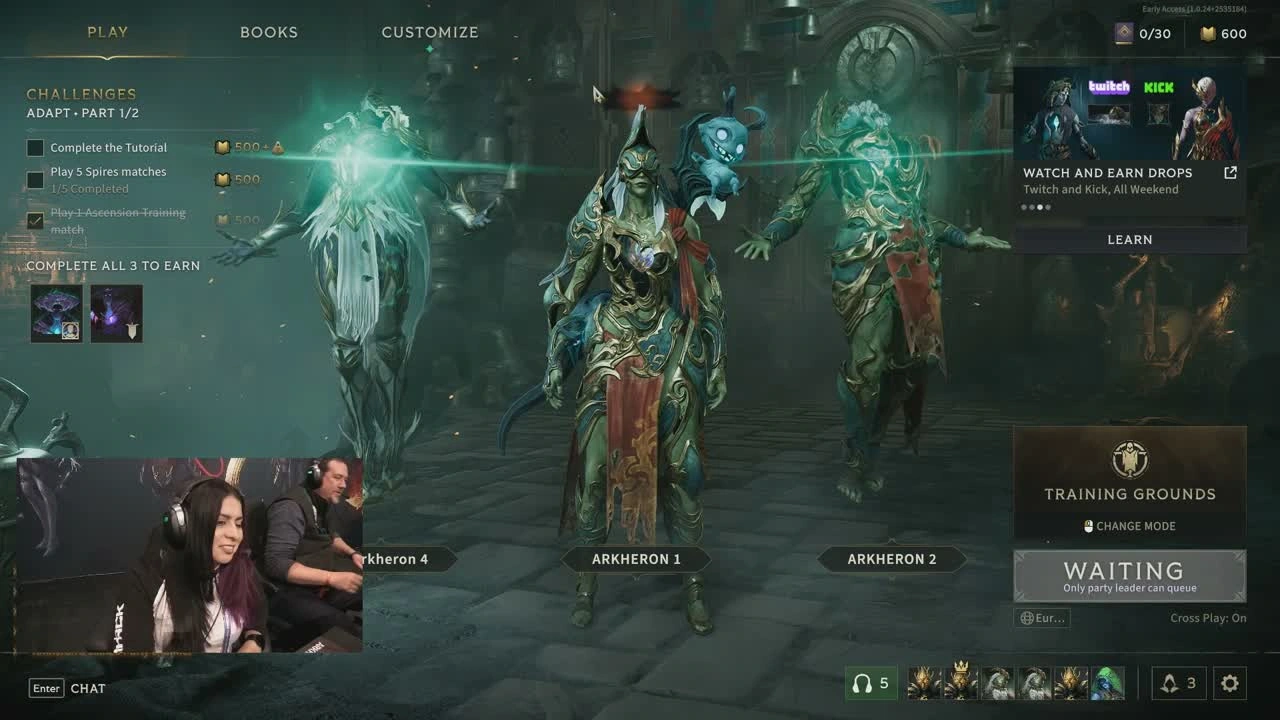
Current Early Access footage shows Cross Play: On beside the party state and Only party leader can queue in a three-player group. If all three players are present but the queue control is unavailable to a member, transfer the action to the leader rather than rebuilding the party.
A friend who joins while a match is already in progress may enter as a spectator and regroup with the party later. Spectator behavior is separate from taking one of the three active slots, so do not use it as a workaround for a full active squad.
How Friend Pass Works with Crossplay
Friend Pass is a free client, not a friend code or a temporary key. The official edition page says a Friend Pass player can complete Tutorial and Training alone. For Ascension and Spires under the regular rules, that player joins a party in which at least one person owns Arkheron. One owner can therefore bring two Friend Pass players into a normal three-person squad.
At launch, Bonfire also announced temporary exceptions: full competitive access for Friend Pass users during the November 27–29 opening weekend, followed by Partner Server free-play access from November 30 through December 6 for players who rep a participating server. Those event dates do not change the permanent crossplay platform list; they change who is eligible to enter competitive modes without an owner in the party.
If a Friend Pass player cannot start Ascension or Spires alone after an event ends, that is an access-rule result, not a crossplay failure. Join the owner’s party first, confirm the owner is recognized, and let the leader queue.
Cross-Progression Is Not Cross-Buy
Bonfire’s published cross-progression account guidance says progress, in-game items, characters, and currencies carry between supported platforms when each platform account is linked to the same Arkheron account. It also warns that two separate Arkheron accounts cannot be merged.
That makes the account decision important: link every platform identity to the same Arkheron account before building progress in separate profiles. The guidance does not mean one store purchase grants every other store’s game license. Microsoft’s Xbox Play Anywhere entitlement is a Microsoft-specific exception for the listed Xbox edition, not proof of Steam or PlayStation ownership.
Because the detailed account statement was published during Closed Beta, this page treats it as Bonfire’s stated account model rather than claiming a fresh multi-platform launch migration test. If your account page shows conflicting platform links, stop before creating a second Arkheron account and use official player support.
Fast Troubleshooting Checklist
Work through these checks in order:
- Confirm both players are using supported launch clients: Steam on Windows, PS5, or Xbox Series X|S.
- Update the game so both clients are on the current Early Access build.
- Return both players to the main menu and leave any existing party.
- Add the other player with the Arkheron friend code, not only the platform network.
- Wait for Social lists to finish loading and confirm the friend appears online.
- Have the party leader send the invite.
- If Join is missing, stop the queue and check whether the squad already has three active players.
- Check Settings > Gameplay > Social if the group expects an open party.
- For Steam Discord joining, run the Discord desktop app, enable activity sharing, and verify Arkheron is registered.
- For Friend Pass, confirm an owner is in the party unless an official free-play event is active.
- After all members regroup in the lobby, have only the party leader start the queue.
Do not reinstall first. A reinstall will not fix a full party, leader-only permission, stale join code, queue-in-progress state, or Friend Pass eligibility rule.
What You Can Safely Conclude
Arkheron has official crossplay across Steam, PS5, and Xbox Series X|S. The shared in-game friend-code system is the universal way to build a mixed-platform squad, while Steam’s Discord controls and Partner Server tools provide additional ways to find or join players. Active squads contain three players total, and party state, leader permissions, queue status, and Friend Pass eligibility explain the most common blocked joins.
The available launch evidence verifies the current Social entries, a Cross Play: On party state, a leader-only queue message, and an Xbox invitation recipient prompt. It does not verify one uninterrupted three-device session or prove that a store purchase transfers outside its own ecosystem. Keeping those limits separate gives you a reliable setup path without turning a partial recording into a broader claim.